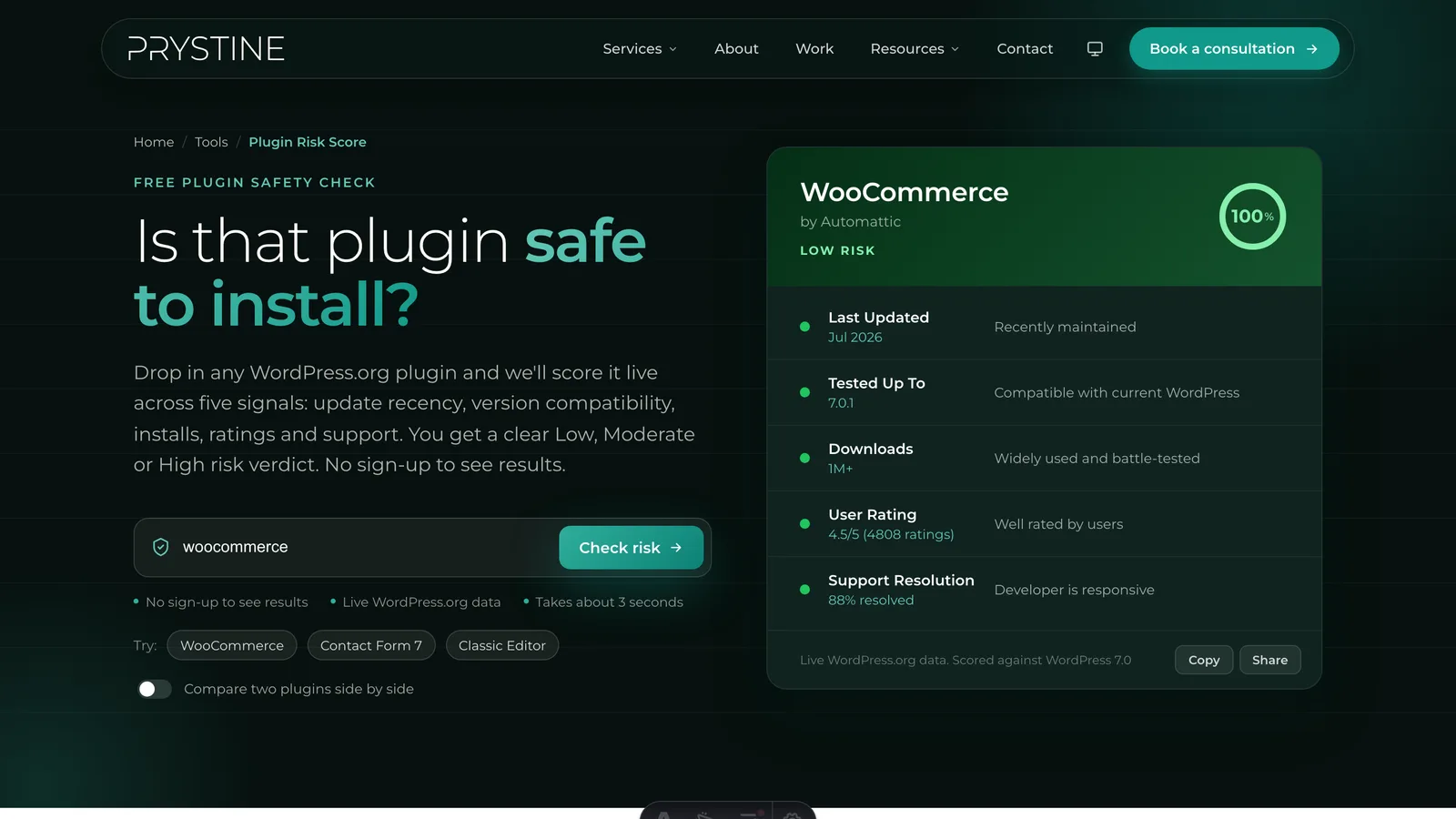
Every WordPress site is one bad plugin away from a slow afternoon — or a very bad week. Plugins run with deep access to your site: your database, your admin pages, often your customers’ data. Installing one is an act of trust. The good news is that you can predict most of that risk in about two minutes, before you ever click “Install Now,” using signals that are all sitting in plain view on WordPress.org.
This guide walks through the five that actually matter, why each one predicts trouble, and how to read it. It’s the same framework our free Plugin Risk Score tool automates — but it’s worth understanding by hand, because the judgement is the valuable part.
Why plugin safety is mostly about maintenance, not malware
When people worry about plugin “safety,” they usually picture malware — deliberately malicious code smuggled into the repository. That happens, but it’s rare, and WordPress.org’s review process catches most of it. The far more common way a plugin hurts you is mundane: it stops being maintained.
An abandoned plugin doesn’t announce itself. It keeps working, right up until a WordPress core update, a PHP version bump, or a newly-discovered vulnerability turns it into a liability. By then the developer is gone, the support forum is a graveyard, and you’re the one debugging a live site. Most real-world plugin incidents trace back to maintenance neglect, not malice — so that’s where your attention belongs.
The five signals that predict risk
1. How recently it was updated
This is the single strongest signal, full stop. A plugin updated in the last few months is almost certainly being watched by someone who’ll patch it when something breaks. A plugin that’s gone quiet for a year is drifting. One that hasn’t shipped a release in three years is, for practical purposes, abandoned — even if the listing is still up.
WordPress.org shows “Last updated” right on the plugin page. Treat under six months as healthy, six-to-fourteen months as worth a second look, and anything beyond that as a real question mark.
2. Compatibility with the current WordPress version
WordPress ships a major release roughly every four months, and each plugin page lists the highest version it’s been “tested up to.” When that number lags well behind the current release, it tells you the developer hasn’t checked their code against recent core changes. Sometimes that’s harmless. Sometimes it means the plugin will throw errors, conflict with newer core behaviour, or fail outright on the PHP version your host just upgraded to.
A plugin tested against the current or previous version is fine. Several versions behind is a yellow flag that compounds with signal #1.
3. Active install count
The active install number is a proxy for scrutiny. A plugin running on hundreds of thousands of sites has been battle-tested across countless hosting stacks, themes, and plugin combinations — and if it had a glaring problem, someone would have hit it and reported it already. A plugin with a few hundred installs hasn’t had that pressure-testing.
Small install counts aren’t disqualifying — every great plugin started at zero, and niche tools serve real needs. But a low number means you’re relying more heavily on the other signals, because the crowd hasn’t vetted it for you.
4. User ratings — read past the average
The star average is useful, but the number of ratings matters just as much. Five five-star reviews tells you almost nothing; a 4.5 average across two thousand reviews tells you a lot. And the reviews themselves are gold: skim the one- and two-star ones specifically, because that’s where you’ll find the recurring complaints — breakage after updates, features that quietly stopped working, support that never replied.
5. Support responsiveness
Scroll to the plugin’s support forum on WordPress.org and look at the “resolved” ratio and the recent threads. Are people getting answered within a few days, or are questions sitting untouched for weeks? A healthy support forum is the clearest sign that a real, responsive human is behind the plugin. A dead one — even on a plugin with a big install base — means that when you hit a problem, you’ll be solving it alone.
A two-minute manual checklist
Before you install anything, open its WordPress.org page and ask:
- Updated within the last 6 months? If no, be cautious.
- Tested up to the current (or previous) WordPress version? If no, expect compatibility friction.
- Healthy install base for what it does? If tiny, lean on the other signals.
- Good rating across a meaningful number of reviews? Read the negative ones.
- Active, responsive support forum? If dead, assume you’re on your own.
If a plugin clears all five, you’re in good shape. If it fails two or more — especially update recency plus support — look for an actively-maintained alternative before you commit.
What about security scanners?
Tools like WPScan, Patchstack, and Sucuri are excellent and worth using — but they answer a different question. They check whether a plugin has a known, catalogued vulnerability right now. That’s necessary, but it’s backward-looking: a plugin with no known CVE today can still be a bad bet if it’s abandoned and unmaintained, because the next vulnerability won’t get patched.
Maintenance-health checks (the five signals above) and vulnerability scanners are complementary. Use the health signals to decide whether to trust a plugin going forward; use a scanner to check whether it has a problem you need to act on today.
Let the tool do the legwork
Doing this by hand is genuinely useful, and you should know how — but you don’t have to do it manually every time. Plugin Risk Score pulls all five signals live from the WordPress.org API and returns an instant Low, Moderate, or High risk verdict, with each factor broken out so you can see exactly why. It’s free, needs no account, and works for any plugin in the WordPress.org repository.
Paste in the plugin you’re considering and you’ll know where it stands in seconds.
Vetting plugins by hand for every site gets old fast, and it’s a big part of what we do at Prystine. If you’d rather someone else kept your WordPress plugins updated, secure and out of trouble, have a chat. Any time you want a quick read on one, our free Plugin Risk Score tool scores it in seconds.

Josh Cox
I'm Josh — I build, host and look after WordPress sites (and increasingly fast Astro / Next.js builds) for Oxfordshire businesses, from Didcot, since 2016. I also tinker with a few products of my own on the side.