A client’s WooCommerce site was taking the best part of five seconds just to start replying. Not to finish loading; to start. Five seconds before the server had even said hello.
To be fair, that was on an uncached visit: any time a page had to be built fresh rather than handed straight from a cache. But that’s a lot more visits than you’d hope. The first person to land on any page, anyone the cache had quietly forgotten, every logged-in load, they all pay the full price. So it mattered.
And on paper, everything was right. Images lazy-loaded, sat behind a CDN, front-end nicely optimised. Every tool that pokes at the front of a website gave it a gold star. Yet it still felt like wading through treacle, because the slowness was happening somewhere those tools never look: on the server, before a single pixel was sent.
The culprit turned out to be a little setting most people have never heard of, quietly gasping for air. Let me introduce you to OPcache.
What OPcache actually does
Here’s the thing about PHP, which is what WordPress is built on: every time someone visits your site, the server has to read your code and compile it into something it can run. Every request. Over and over. It’s a bit like re-reading the instructions from scratch every single time you make a cup of tea, rather than just… knowing how.
OPcache is the fix. It compiles your code once, keeps the result in memory, and hands that ready-made version to every visitor after. When it’s working, it’s invisible and everything’s quick. You never think about it, which is exactly the point.
The trouble starts when it runs out of room.
A cache with no room to breathe
When we looked under the bonnet, OPcache was switched on but 100% full, with no headroom left. Worse, its hit rate, the percentage of times it found the ready-made version instead of recompiling, was sitting at about 28%.
Let that sink in. Roughly seventy per cent of the site’s code was being recompiled on every request. Every page, every visitor, every time. Even the robots.txt file, which is about three lines long, was taking well over two seconds, because the whole machine had to warm up from cold to serve it.
That was the five seconds. Not the images. Not the theme. A cache with no room to do its job.
Now, the tempting answer is to just throw more memory at it. And you can: more OPcache headroom, or an object cache like Redis layered on top, will take the pressure off. It’s the sort of thing I build into some of my own hosting plans, for exactly this kind of site. But reaching straight for more memory is a bit of a sticking plaster; it papers over bloated code rather than clearing it out, and you’ll be back asking for more before long. The better move, and the one that makes any amount of cache go further, is to shrink the code itself. So that’s where we went first: every plugin had to earn its place.
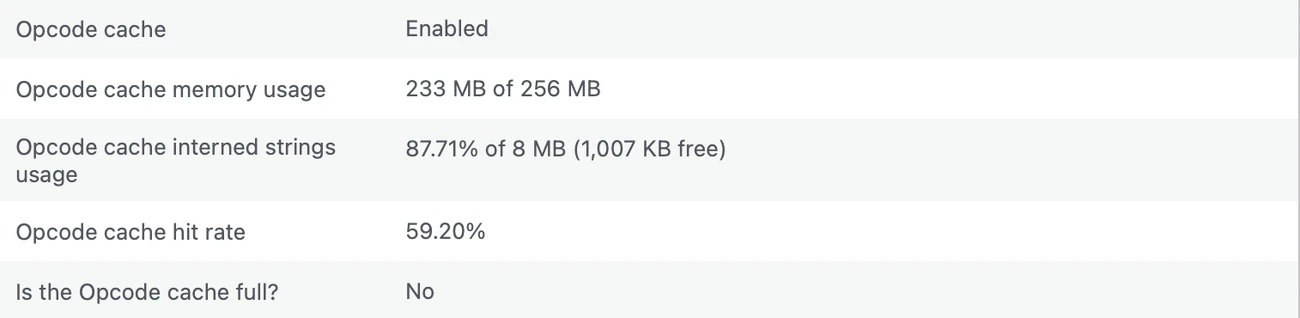
That said, cramped isn’t the goal either. On the hosting we run ourselves we size OPcache to suit the site rather than leaving it on a stingy default, this one’s on a comfortable 256MB. Right-sizing the cache and right-sizing the code go hand in hand.
Hunting the hungry plugins
This is the part that surprises people. Every plugin you install isn’t just “a feature”. It’s code that has to be compiled and squeezed into that same finite cache, competing with everything else. Ten plugins you forgot you had are ten plugins fighting WooCommerce for space.
So we profiled it, essentially asking OPcache “who’s eating all the memory?”, and the answers were… illuminating.
- A plugin loading a giant third-party library on every single page. It was hauling a huge software kit into memory for every visitor, when it only ever needed it in the admin area. That one plugin alone was eating over 9MB. (I’ll be honest: I’d written that plugin. Nothing like auditing your own homework.) We told it to only load where it’s actually used, and its footprint dropped from 9MB to basically nothing.
- An events calendar the site barely used. Big, heavy, and earning its keep about as much as a chocolate teapot. Gone. That single removal pushed the hit rate from 28% to 42% and shaved a second off the response time on its own.
- A page-builder plugin hogging 5.5MB to style a grand total of a handful of pages. We rebuilt those pages with WordPress’s own built-in blocks and retired the plugin entirely.
- A well-known SEO plugin weighing in at 7MB. We swapped it for a leaner one that does the same job for a tiny fraction of the memory, migrating every scrap of settings across so nothing changed for Google.
Piece by piece, the cache started breathing. That 28% hit rate climbed to 42%, then 48%, then 57%, and settled around 60%. The site’s response time came down with it, meaningfully, across the board.
The honest bit
I’m not going to pretend there’s a magic number that makes everything instant. A busy WooCommerce site needs a certain amount of genuinely essential code, so there’s always a balance to strike between right-sizing the cache and right-sizing what you’re asking it to hold. Get both in order and the next big win is caching whole pages at the edge, so most visitors are handed a ready-made copy and never wait on the origin at all. Which is rather the point of pairing a serious site with hosting that’s built for it, rather than one that’s fighting you.
But the lesson holds, and it’s a good one.
Plugins are not free
Every plugin you add is a lodger in a flat with fixed square footage. One or two, no bother. Thirty, and they’re all elbowing each other for room, and your visitors feel it as a slow, sluggish site with no obvious cause.
“Deactivated” isn’t “gone”, either; a deactivated plugin still sits in the building. And the fastest sites I look after generally aren’t the ones with the cleverest caching plugin bolted on top. They’re the ones running less code in the first place.
So if your site feels slow and every front-end tool insists it’s fine, look further back, at the server, at the cache, at the pile of plugins nobody’s questioned in three years. It’s often not a speed problem so much as a housekeeping one.
Keeping that house in order, quietly, in the background, is a fair chunk of what looking after a website actually means. Most of our clients never see any of this. They just notice the site feels quick. Which, again, is exactly the point.

Josh Cox
I'm Josh — I build, host and look after WordPress sites (and increasingly fast Astro / Next.js builds) for Oxfordshire businesses, from Didcot, since 2016. I also tinker with a few products of my own on the side.